

How to Create a Bilibili Account and Upload a Video

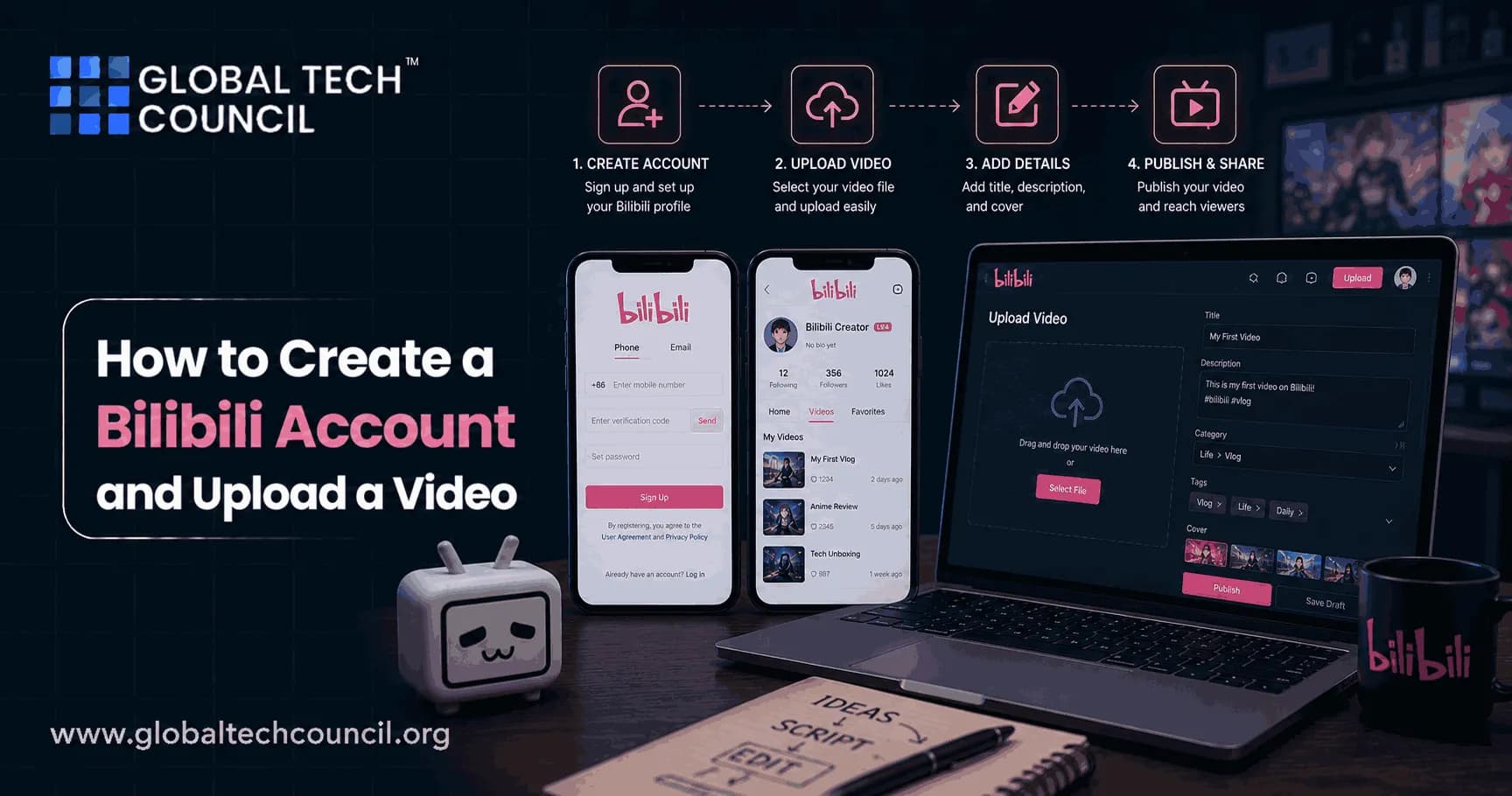
This guide walks through creating a new Bilibili account, completing your profile, and uploading and publishing your first video, using the Bilibili Creator Center. For users interested in building broader digital skills alongside content creation, exploring a Tech Certification can also provide useful technology-focused learning opportunities.
Part 1: Creating a Bilibili Account
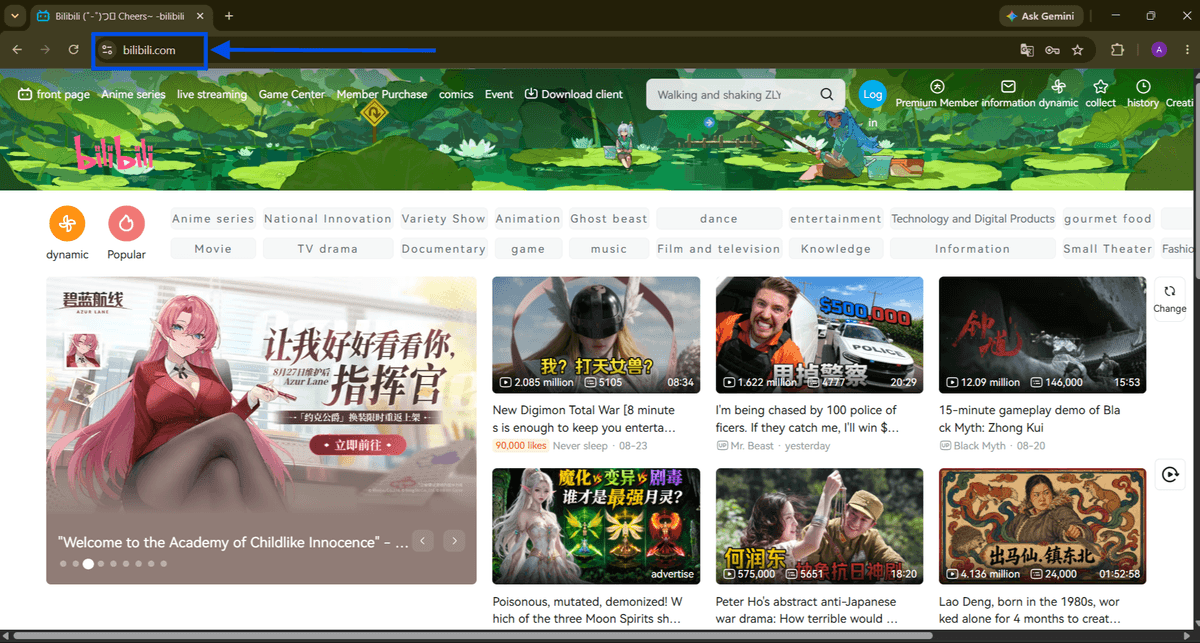
Step 1: Go to the Bilibili website
Open your browser and navigate to bilibili.com. This is the main Bilibili homepage, where you can browse content and access the login/registration options.

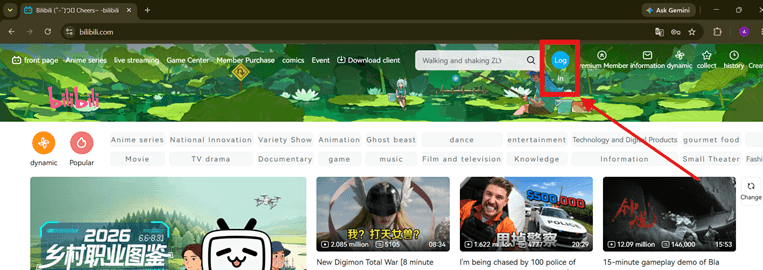
Step 2: Click "Log in"
In the top-right corner of the homepage, click the blue "Log in" button to open the login/registration window.
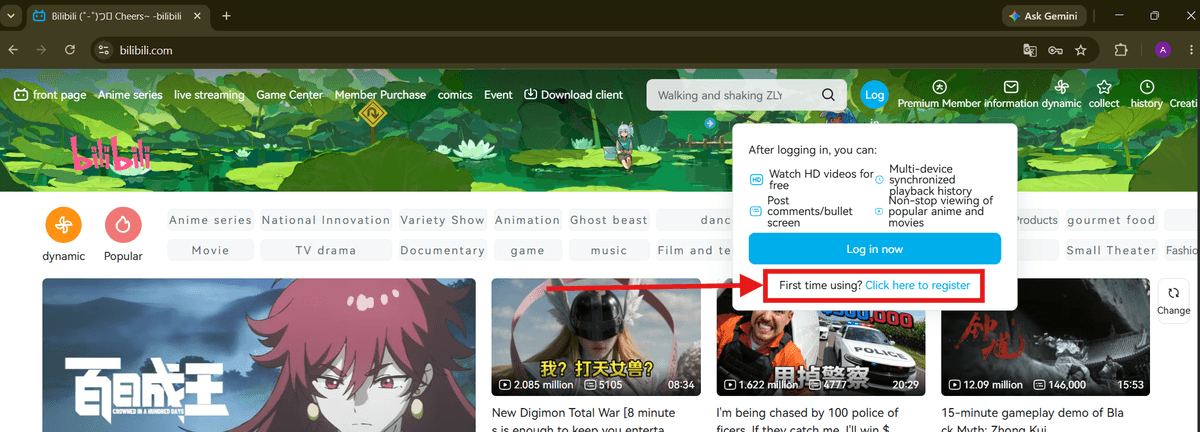
Step 3: Choose to register as a new user
A pop-up window will appear with QR code login, password login, and SMS login options. Since this is a new account, click "First time using? Click here to register" to proceed with SMS-based registration.
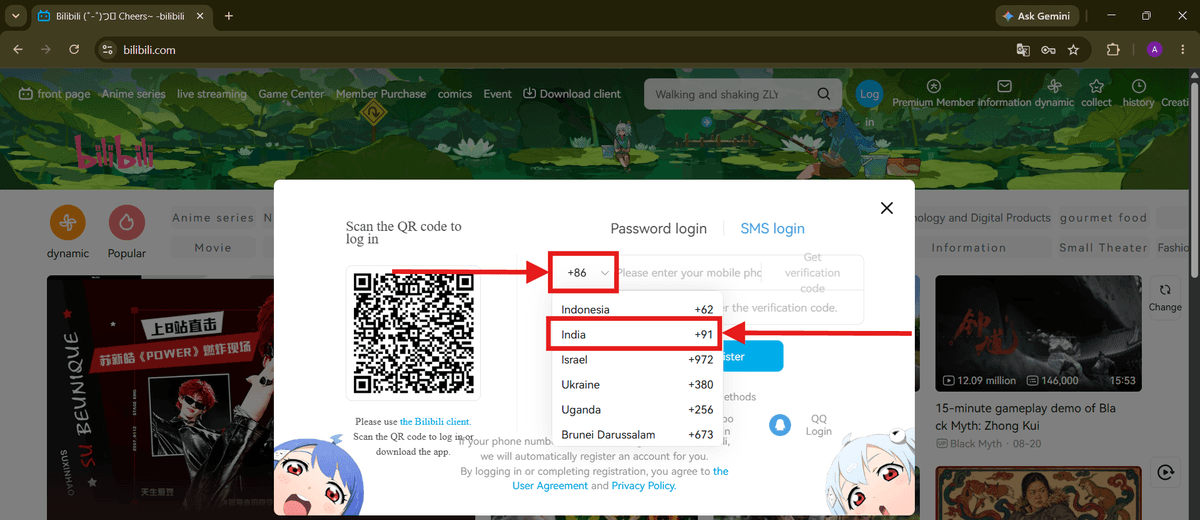
Step 4: Select your country code
Click the country code dropdown (default is +86 for China) and select the country code that matches your phone number (for example, +91 for India).
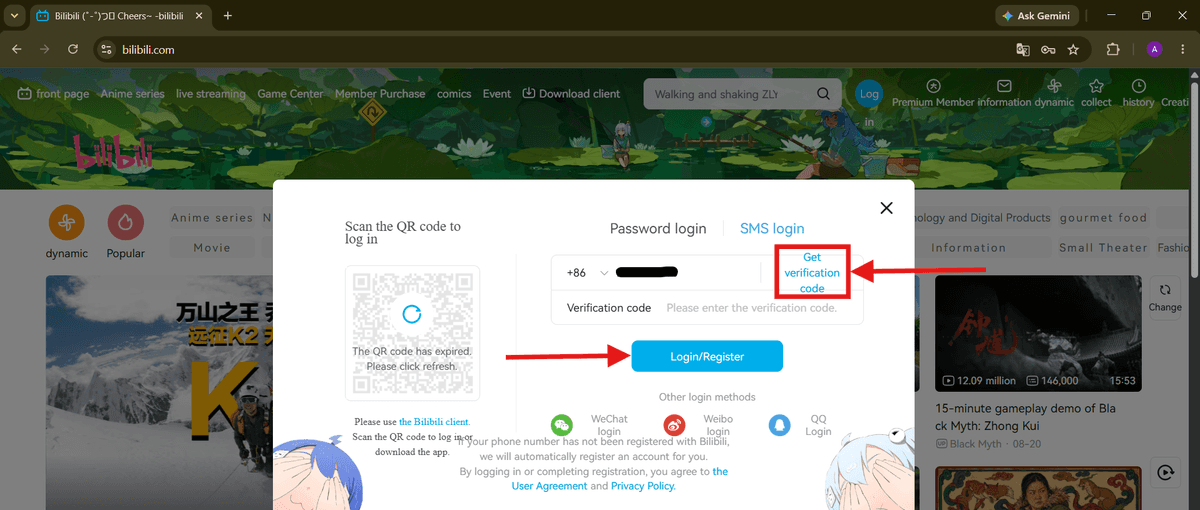
Step 5: Enter your phone number and verify
Type in your phone number, then click "Get verification code." Bilibili will text you a code enter it in the "Verification code" field, then click "Login/Register" to create your account. Since the number isn't registered yet, Bilibili automatically creates a new account for you.
Part 2: Setting Up Your Profile
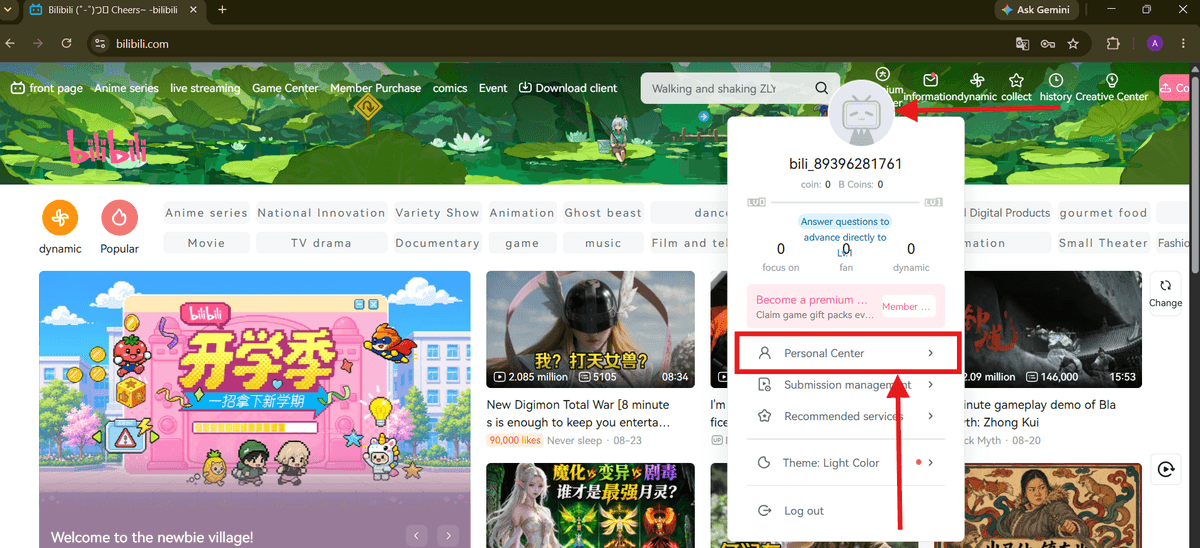
Step 6: Open your Personal Center
Once logged in, click your profile avatar in the top-right corner. A dropdown menu will appear click "Personal Center" to manage your account details.
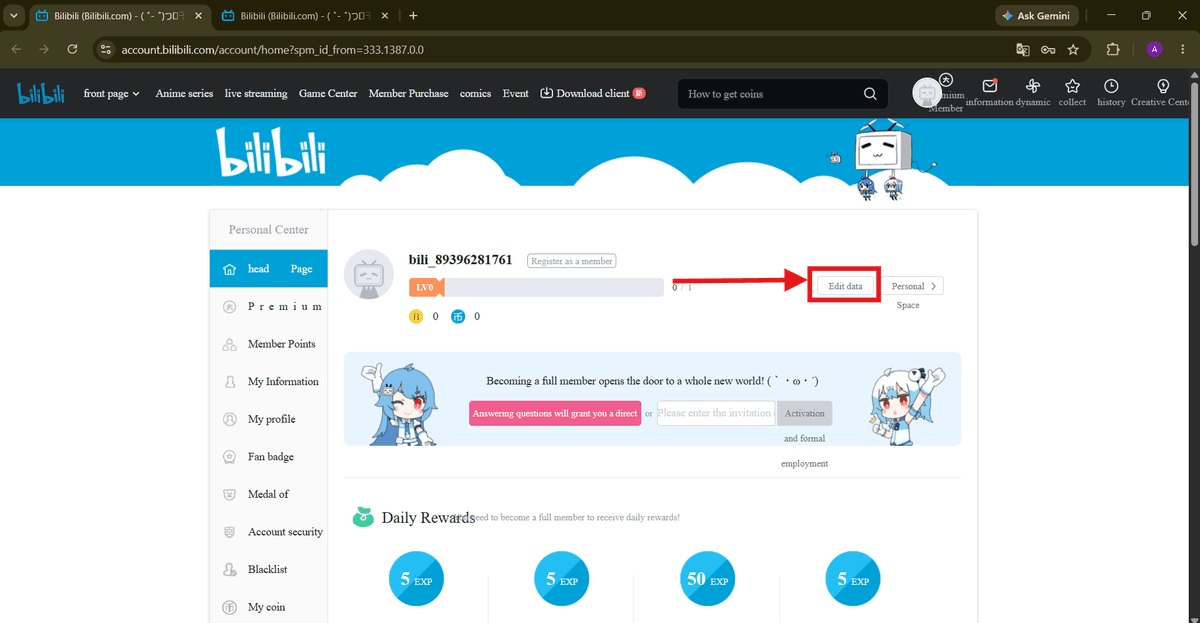
Step 7: Click "Edit data"
On your Personal Center home page, click the "Edit data" button next to your username and level bar to start filling in your profile information.
Step 8: Fill in your basic information
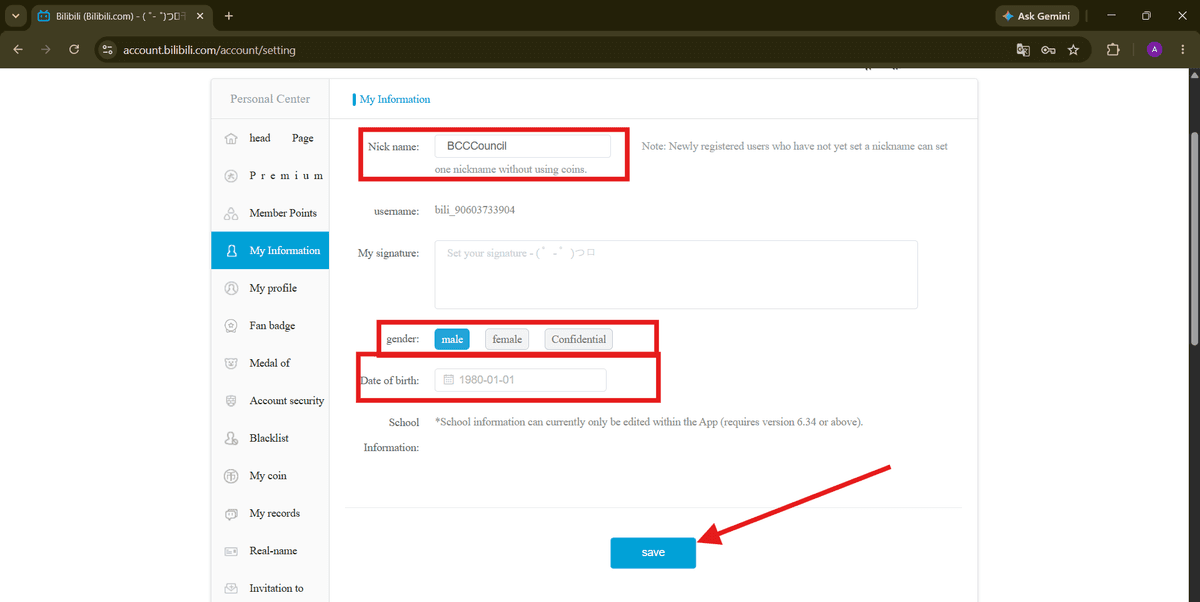
Under "My Information," set your nickname, gender, and date of birth. Once you're finished, click "save" to apply the changes to your account.
Step 9: Upload a profile picture
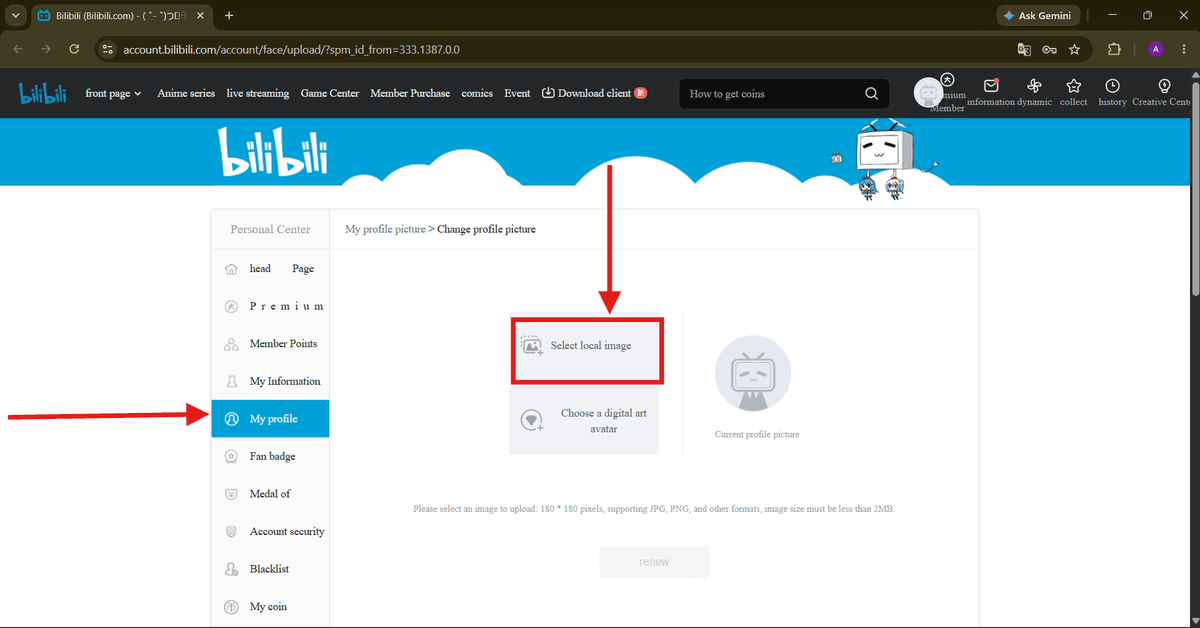
Go to the "My profile" tab in the sidebar, then click "Select local image" to upload a photo from your computer as your profile picture (image must be under 2MB, ideally 180x180 pixels).
For people developing skills beyond basic account management, learning about emerging technologies can complement digital content creation. A Deep Tech Certification can be relevant for those who want to explore deeper technology concepts and expand their understanding of technology-driven fields.
Part 3: Uploading a Video
Step 10: Go to Video submission
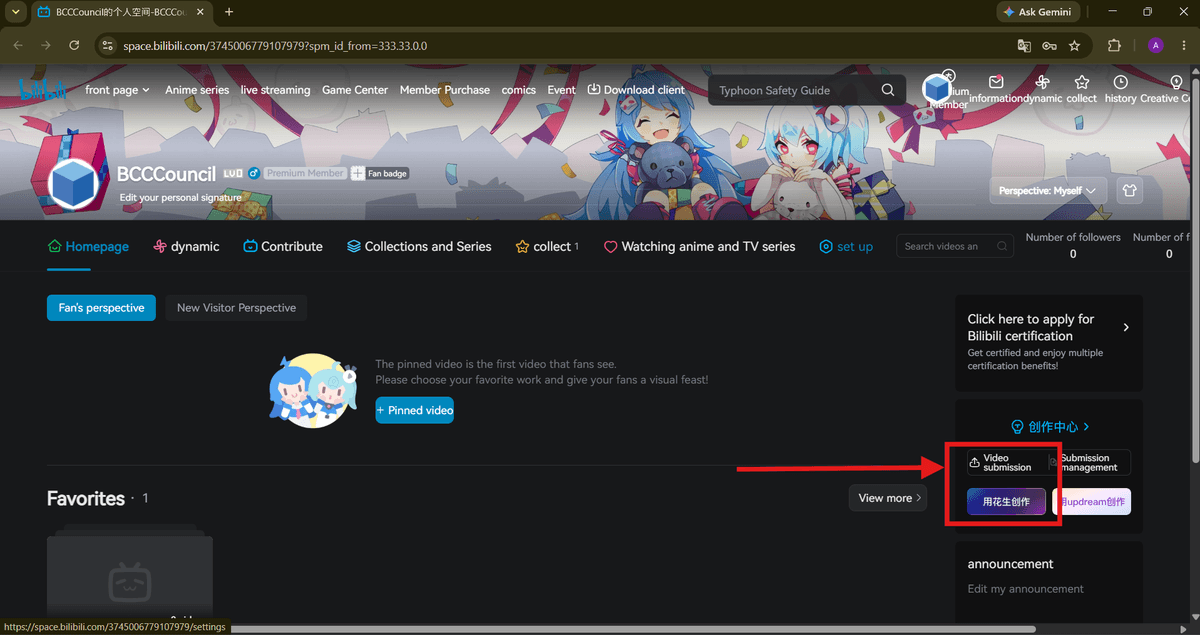
From your Personal Center homepage, click "Video submission" (or the upload icon) to open the Bilibili Creator Center, where videos are uploaded and managed.
Step 11: Upload your video file
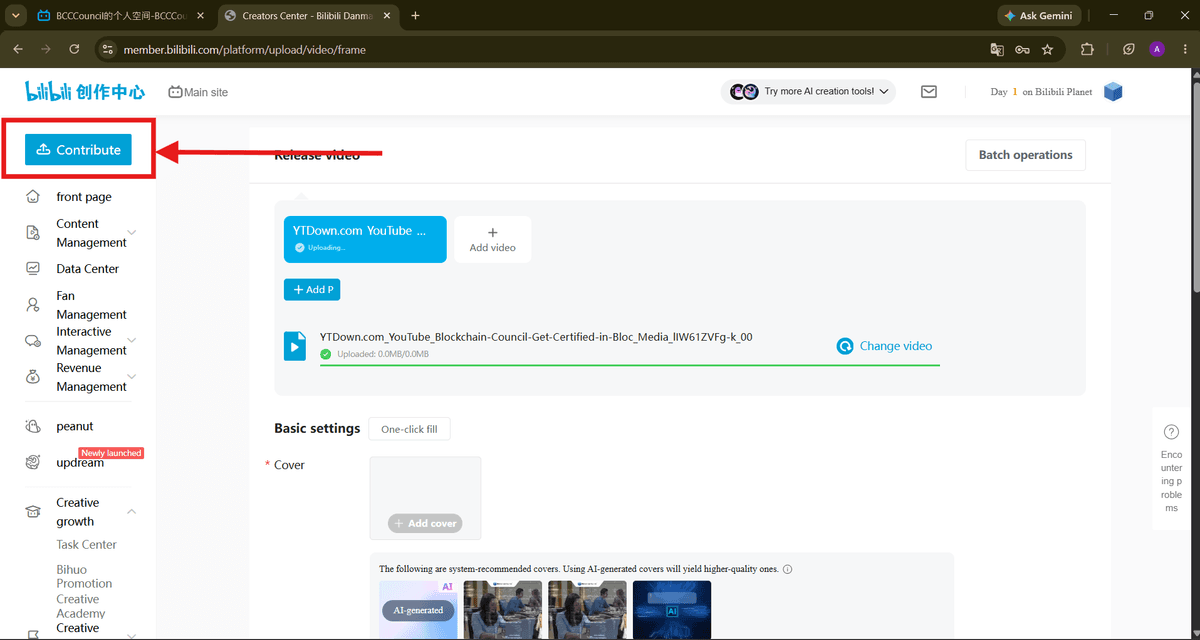
In the Creator Center, click "Contribute" (or "Add video") and select the video file from your computer. Wait for the file to finish uploading you'll see a progress bar and a confirmation once the upload is complete. You can also add a cover image for the video under "Basic settings."
Step 12: Add details and submit
Scroll down to fill in additional details such as the introduction/description. Review the "More settings" section if needed (statements and rights, video elements, interaction management), then click the blue "Submit your" button to publish your video.
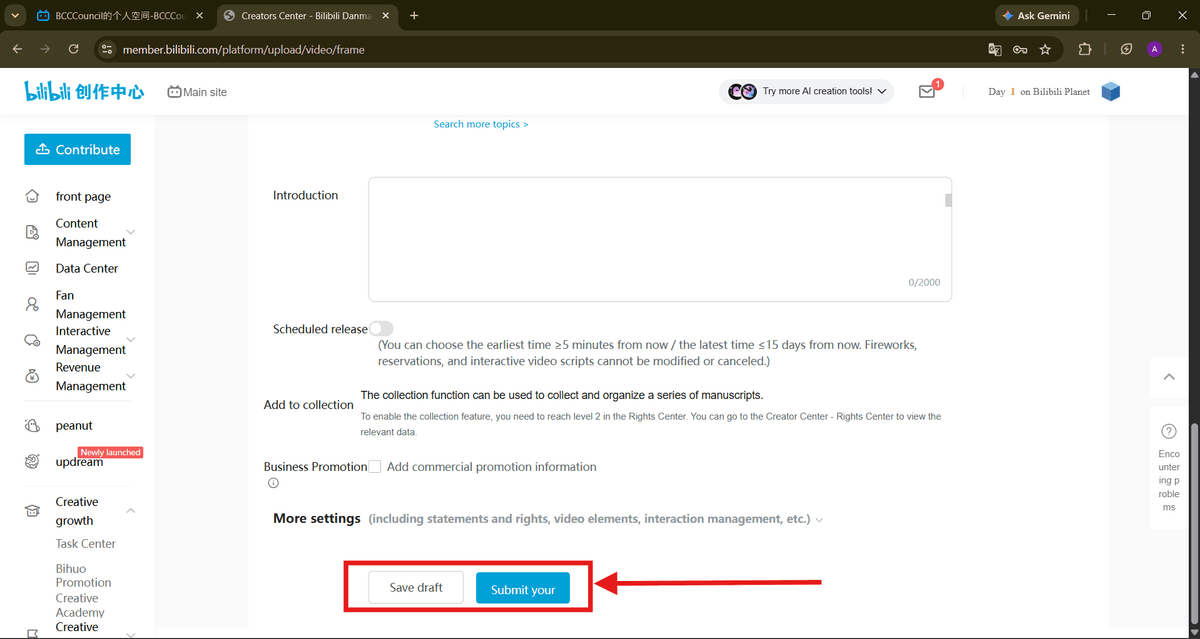
That's it! Your Bilibili account is set up and your video has been submitted for publishing.
Future-Ready Skills
As technology becomes increasingly important across industries, students need opportunities to develop future-ready skills early in their education. A Tech Olympiad can introduce students to areas such as artificial intelligence, coding, cybersecurity, robotics, and computational thinking while encouraging curiosity and continuous learning.
As Bilibili creators build an online presence, understanding how to present content effectively and reach the right audience can also become valuable. A Marketing Certification can complement content creation skills by helping learners develop broader knowledge of marketing, audience engagement, and digital communication.
FAQs
1. How do I create a Bilibili account?
To create a Bilibili account, open Bilibili through its official website or app and choose the registration option available to you. Bilibili's international terms state that users may create an account using a phone number, email address, or supported third-party account, depending on availability.
2. Can I create a Bilibili account outside China?
Yes. Bilibili provides services for international users, although available features and registration options can vary by region. Users should follow the registration methods officially presented by Bilibili rather than using unauthorized methods.
3. What information do I need to create a Bilibili account?
Depending on the registration method available in your region, you may need a phone number, email address, or supported third-party account. Bilibili also requires users to provide authentic and accurate registration information.
4. Do I need a phone number to register for Bilibili?
Not necessarily. Bilibili's international terms identify phone number, email address, and certain third-party accounts as possible registration methods. The options displayed during registration can depend on the user's location and the service being accessed.
5. Do I need a Bilibili account to upload videos?
Yes. Bilibili states that users need an account to access the full set of functions, particularly functions such as video sharing.
6. How do I upload a video to Bilibili?
For international users, Bilibili's official FAQ directs creators to its dedicated video-upload platform, Bilibili Studio. After signing in, follow the upload workflow provided by the Studio interface to select your video, add publishing information, and submit it.
7. Where can I upload videos to Bilibili?
International creators can use Bilibili's official Studio upload portal. Bilibili's international FAQ specifically directs users to studio.biliintl.com for video uploads.
8. Can I upload videos to Bilibili from a computer?
Yes. A computer is a convenient option for uploading videos through Bilibili Studio. After signing in, you can use the Studio interface to select your video and complete the required publishing information.
9. Can I upload videos to Bilibili from a mobile phone?
Bilibili also provides video-publishing functionality through its mobile application. The exact buttons and interface can change as the app is updated, so use the publishing/upload option currently displayed in the official Bilibili app.
10. What should I prepare before uploading a video to Bilibili?
Before uploading, prepare:
Your finished video file
A clear and relevant title
An appropriate thumbnail
A concise description
Relevant tags or keywords
The correct content category
Any necessary copyright or source information
Preparing these elements beforehand makes the publishing process easier and helps present your content clearly.
11. How do I add a title to a Bilibili video?
During the video-submission process, enter a clear and accurate title that describes the video's main topic. For SEO and discoverability, naturally include the primary topic or keyword without making the title misleading or excessively repetitive.
12. How do I choose a thumbnail for a Bilibili video?
Choose a thumbnail that accurately represents the video and makes the subject immediately understandable. Use readable text when appropriate, strong visual contrast, and an image that matches the video's actual content.
13. Can I add tags and a description to my Bilibili video?
Yes. When publishing content, use the available fields to describe your video accurately. Relevant tags and a useful description can help viewers understand the topic and discover related content.
14. What video formats can I upload to Bilibili?
Bilibili supports video uploads through its Studio platform, but file-format, size, resolution, and other technical limits can change. Check the upload interface for the current requirements before preparing your final video.
15. How long does Bilibili take to publish an uploaded video?
An uploaded video may need to go through Bilibili's processing and review procedures before it becomes publicly available. The exact time can vary depending on the content and platform conditions, so there is no universal publishing time.
16. Why is my Bilibili video still under review?
A video can remain under review while Bilibili processes and evaluates the submitted content. If there is a problem with the video, metadata, copyright, or another requirement, Bilibili may restrict, reject, or require changes to the submission.
17. Can I upload copyrighted videos to Bilibili?
You should upload only content that you created yourself or have the necessary rights or licenses to distribute. Bilibili's international terms require users to have the necessary rights or licenses for their user-generated content.
18. Can beginners upload videos to Bilibili?
Yes. Beginners can start by creating an account, accessing the appropriate upload interface, preparing an original video, and completing the publishing information. Bilibili officially provides an international video-upload portal for creators.
19. What are the best practices for uploading a video to Bilibili?
For a beginner-friendly publishing workflow:
Create your Bilibili account through an official registration method.
Secure your account credentials.
Prepare an original or properly licensed video.
Open Bilibili Studio.
Upload the video.
Add an accurate title and description.
Select the appropriate category and tags.
Choose a relevant thumbnail.
Review the publishing details.
Submit the video and monitor its status.
Bilibili's terms also require users to keep their account credentials secure and prohibit unauthorized use of the service.
20. What is the easiest way to start creating videos on Bilibili?
The simplest approach is to create an account, prepare an original video, access Bilibili Studio, upload the file, complete the title and other publishing details, and submit it for review. International creators can use Bilibili's official Studio portal for video uploads.
Related Articles
View All
Blogs
Bilibili Explained: Features, Content, Users, and Growth
Bilibili is a Chinese video and entertainment platform combining user-generated videos, professional content, livestreaming, gaming, and highly interactive communities. Explore its major features, content categories, audience, creator ecosystem, and the factors behind its growth.

Blogs
What is Double in C?
Many programming tasks require handling numbers with precision, and choosing the right type of data to store these numbers is crucial. When you’re working with C programming, you will come across a data type called double. It is essential for handling numerical precision in many programming…

Blogs
What is Boolean in C?
Learn what Boolean data types are in C, how true and false values work, Boolean variables and arrays, logical and comparison operators, and the relevance of Boolean programming in modern C development in 2026.
Trending Articles
The Role of Blockchain in Ethical AI Development
How blockchain technology is being used to promote transparency and accountability in artificial intelligence systems.
AWS Career Roadmap
A step-by-step guide to building a successful career in Amazon Web Services cloud computing.
Top 5 DeFi Platforms
Explore the leading decentralized finance platforms and what makes each one unique in the evolving DeFi landscape.