

Perplexity Introduces AI Voice Assistant for iPhones
 Tosh Marketing
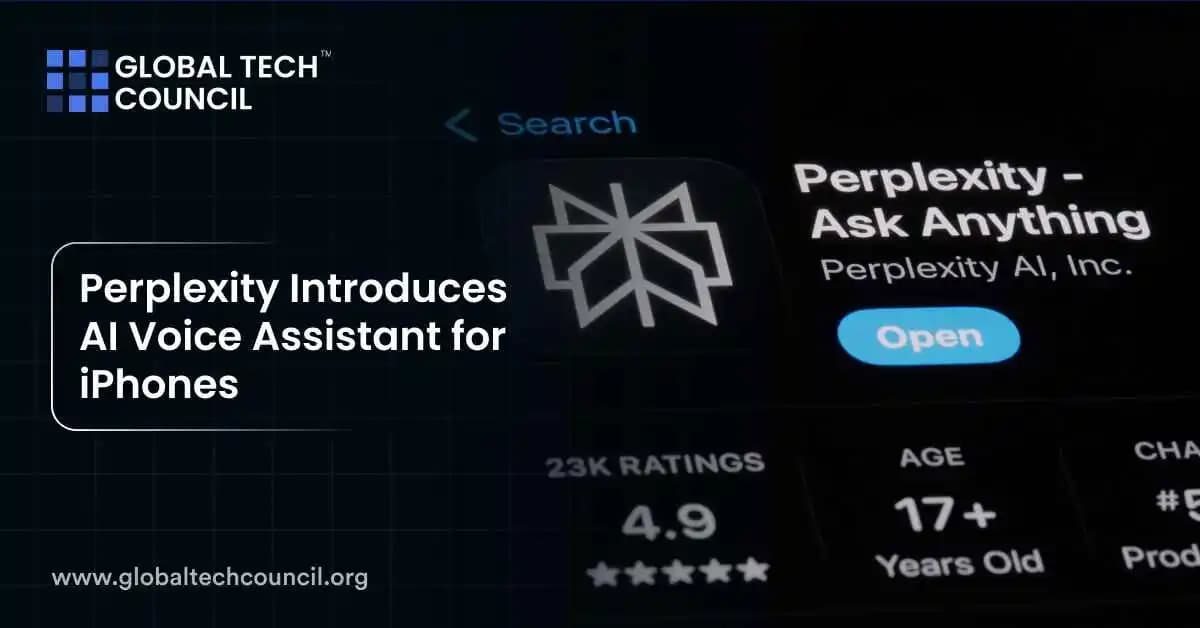

Perplexity has launched a new AI voice assistant for iPhones, letting users search, ask questions, and get answers by speaking. It offers real-time internet access, follow-up conversations, and clear source citations. This makes it stand out from older voice tools like Siri and even newer AI like ChatGPT’s mobile app.
You can use Perplexity’s assistant inside its iOS app to get up-to-date information quickly, hands-free. It’s fast, smart, and built for people who prefer talking over typing.
What Is Perplexity’s AI Voice Assistant?
Perplexity’s AI voice assistant is a smart, voice-powered search tool. You ask something aloud, and it responds using both its AI brain and live internet results. It also shows you where the info came from.
You don’t need to type. Just open the app, tap the mic, and speak. You can ask follow-up questions too—it remembers what you said earlier.
It’s a mix of an AI chatbot and a real-time search engine—all operated by voice.
Key Features of Perplexity Voice
- Real-time web search for updated, trusted answers
- Voice-first design built for easy hands-free use
- Follow-up questions to keep conversations going
- Source links so users can verify the info
- Free to use with no paywall for core features
- Mobile-friendly interface with fast response times
- Available globally through the iOS App Store
This tool is especially helpful for research, news summaries, how-tos, and comparisons.
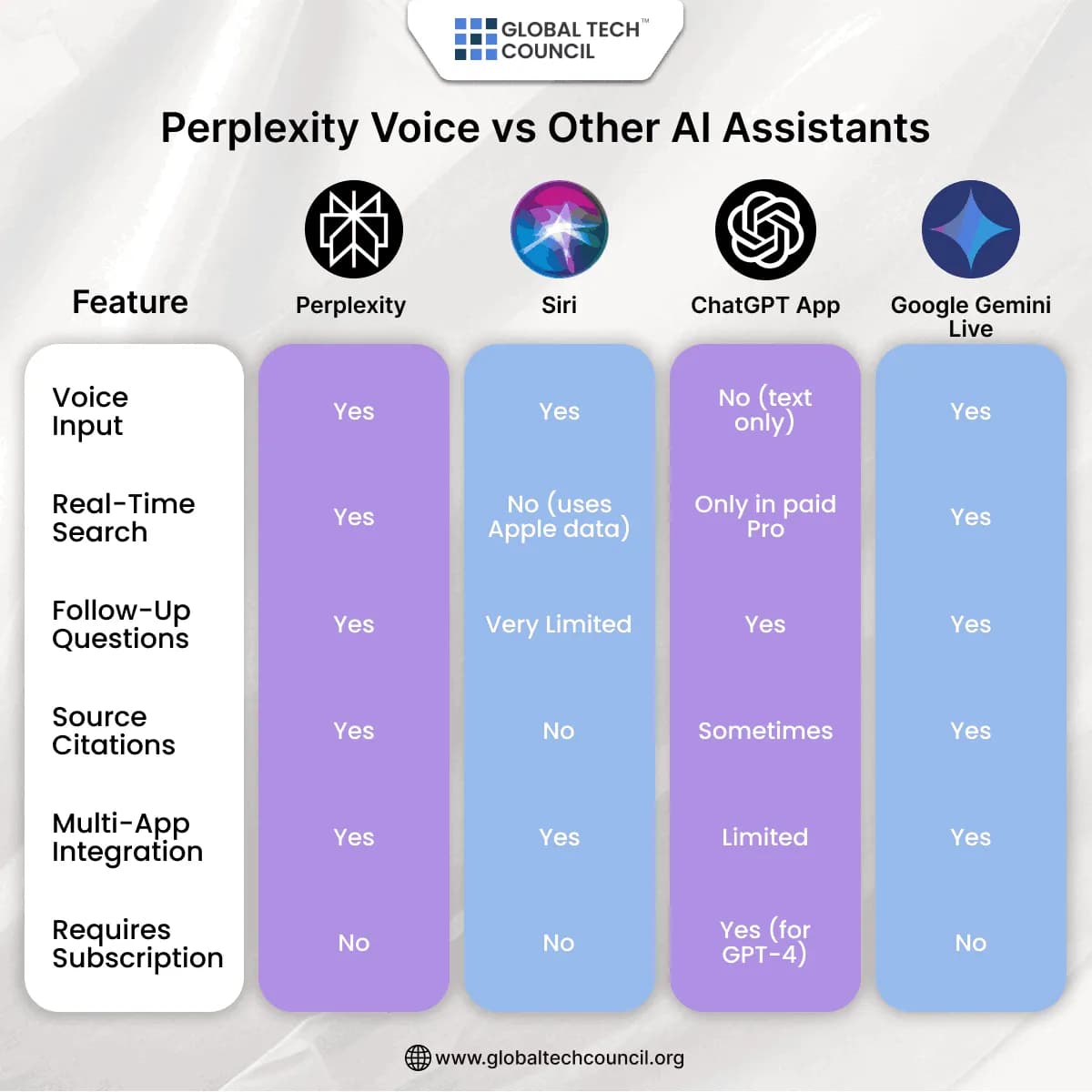
Perplexity Voice vs. Other AI Assistants
How to Use It on iPhone?
- Download the Perplexity app from the App Store
- Open it and tap the microphone icon
- Ask a question out loud
- Listen or read the response
- Ask follow-ups without retyping your query
You’ll get results from the web plus a short, AI-written summary.
You can also switch between speaking and typing if needed, which makes it more flexible than Siri or ChatGPT.
How It’s Different from Siri and ChatGPT
Siri can do basic tasks but can’t search the internet well or give smart summaries. ChatGPT is great at talking, but the free version doesn’t access the live web.
Perplexity combines voice, AI, and live search into one free app. It’s like talking to an up-to-date research assistant.
It’s also faster at delivering results than loading a browser and typing a query. And it includes direct links to sources.
What You Can Do with Perplexity Voice
| Task | Example Command |
| Look up quick facts | “How tall is Mount Everest?” |
| Get news summaries | “Summarize today’s Apple keynote.” |
| Compare products | “Compare iPhone 15 Pro and Galaxy S24 Ultra.” |
| Explain concepts | “What is the blockchain in simple terms?” |
| Learn something fast | “Teach me about World War II in 1 minute.” |
| Explore trends | “What are the top AI tools in 2025?” |
| Understand policies | “Explain EU’s Digital Services Act.” |
Who Should Use It?
Perplexity Voice is helpful for:
- Students needing fast homework help
- Content creators doing topic research
- Busy professionals who prefer talking
- Curious users who want real answers fast
- People with accessibility needs
It saves time, feels natural, and shows where its answers came from.
It also helps users who are multitasking or driving, making voice input safer and smarter.
Competitor Gap: What Perplexity Does Better
Compared to Siri, it understands better and explains more. Compared to ChatGPT, it doesn’t require a paid plan for browsing. And unlike Google Gemini, it’s more focused on Q&A than full app control.
Perplexity also handles follow-up queries more smoothly. If you ask about climate change, and then say “how does that affect India?”—it keeps the context.
Its clear edge is real-time information and natural follow-up conversations—without switching tools or paying.
Privacy and Access
Perplexity claims that no user voice data is stored permanently. The app processes queries and then discards them, keeping privacy a focus. You don’t need to create an account to start using the app.
It’s free to download and works on any iPhone running iOS 16 or later. Android support is expected soon.
Final Thoughts
Perplexity’s AI voice assistant turns your iPhone into a smarter, faster research tool. You ask questions, it searches the web, and gives clear answers with sources. It’s easy to use, free to access, and perfect for learning on the go.
The assistant saves time, helps with productivity, and offers a better voice AI experience than traditional tools. It’s especially valuable for students, marketers, researchers, and anyone who needs on-demand answers without typing.
If you’re exploring how AI is changing everyday tools, check out the Data Science Certification. Want to use AI in business or content work? The Marketing and Business Certification might be for you. To upskill further in advanced systems, check out the Deep Tech Certification.
Related Articles
View All
AI & ML
What Is Kimi K3?
Kimi K3 is a large language model developed by Moonshot AI, designed for advanced reasoning, coding, multilingual understanding, and AI agent applications. Learn how Kimi K3 works, its key features, use cases, and how it compares with other leading AI models.
AI & ML
How GPT-Live Changes Real-Time AI Assistance for ChatGPT Users
GPT-Live brings full-duplex voice, smarter turn-taking, live translation, and GPT-5.5-backed reasoning to ChatGPT Voice for real-time AI assistance.
AI & ML
GPT-Live-1 and GPT-Live-1 Mini Explained: Features, Use Cases, and Global ChatGPT Access
GPT-Live-1 and GPT-Live-1 Mini bring full-duplex voice, live translation, multimodal answers, and wider ChatGPT access to free and paid users.
Trending Articles
The Role of Blockchain in Ethical AI Development
How blockchain technology is being used to promote transparency and accountability in artificial intelligence systems.
AWS Career Roadmap
A step-by-step guide to building a successful career in Amazon Web Services cloud computing.
Top 5 DeFi Platforms
Explore the leading decentralized finance platforms and what makes each one unique in the evolving DeFi landscape.